

Skip to content
Let's talk about your project
Star Micronics Printing Plugin for WooCommerce

Star Micronics Printing Plugin for WooCommerce

CHF 199

SKU: star-micronics-printing-plugin Category: Tags: , , , ,

Description

Star CloudPRNT for WooCommerce – Upgraded & HPOS Compatible
Print your WooCommerce orders automatically on your Star Micronics CloudPRNT printers – faster, smarter, and now fully compatible with WooCommerce High-Performance Order Storage (HPOS).
This plugin connects your online store directly to Star CloudPRNT-enabled printers, so new orders are instantly printed without manual action. Perfect for restaurants, takeaways, retail shops, and any business that needs real-time order printing.

Key Features
✅ HPOS Ready – fully compatible with WooCommerce’s latest High-Performance Order Storage for better scalability and reliability.
✅ Automatic Printing – orders are sent directly to your Star CloudPRNT printer.
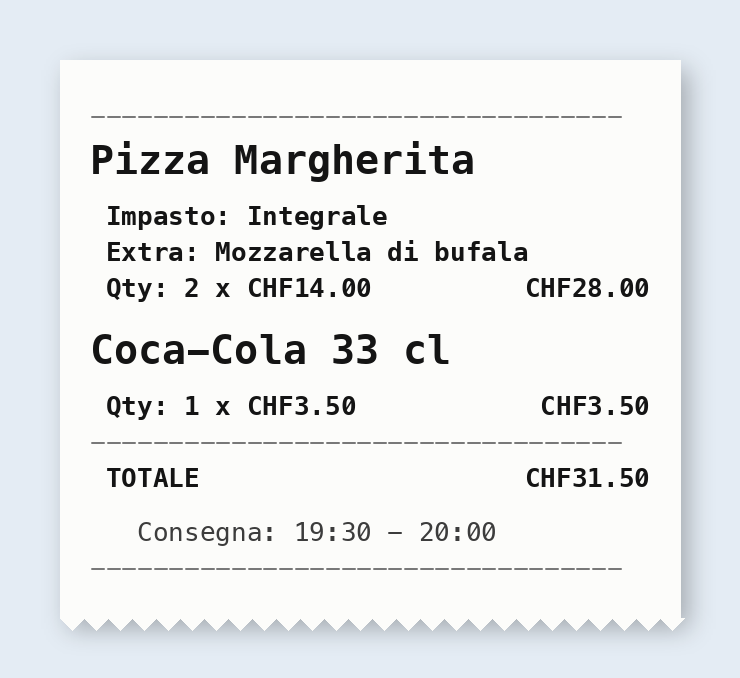
✅ Customizable Templates – control how your receipts look (items, prices, order notes, customer details).
✅ Flexible Printing Rules – choose which orders to print and when (new order, processing, completed).
✅ Multiple Printers Support – connect several Star CloudPRNT printers for different locations.
✅ Optimized Performance – upgraded to be faster, more stable, and future-proof.
✅ 2 Printers – option to print simultaneously on 2 separate printers.

Why Choose This Plugin?
With the upgraded version, you’re not just keeping up with WooCommerce’s evolution (HPOS), you’re future-proofing your business. This means smoother order handling, faster performance, and compatibility with the latest WooCommerce standards – all while ensuring your orders keep printing automatically without hassle.

Ready to streamline your WooCommerce order printing?

Install the new Star CloudPRNT for WooCommerce plugin and let your printer do the work while you focus on your business.

LICENSE
Once purchased you can re-download it anytime you want and get updated versions for one year

CHANGELOG
2.1.21 – 17 September 2025: NEW! Added support to print on two separate printers at the same time.
2.1.20 – 22 August 2025: fixed correct shipping method being printed in receipt


Versions

Changelog

Perpetual license for one site: you pay only once, no annual fee. For sites hosted by ticinoWEB the plugin is already included.

  • WordPress 5.9 or later
  • PHP 8.5 or later
  • WooCommerce 7.0 or later
  1. 3.1.3Latest version
    Fixed
    • Partner orders on the receipt. An order to be delivered to a partner (office, school…) appeared as «<< Pickup on site» if placed from the website (the checkout records it as pickup at a «pickup point», with the pickup date) and with only the shipping title if done from the app Little Inka; the partner's name never appeared. Now it prints «>> Delivery to partner» with the partner's name below (meta pickup_location of the checkout or stud_office_address of the app) and no longer prints the QR to the customer's home address.
  2. 3.1.2
    Fixed
    • License: the first check after installation only ran with the daily check and the Settings → Licenses ticinoWEB page stayed on «Verifying license…»; now the page verifies immediately (library includes/tw-license.php 1.1.1).
  3. 3.1.1
    Changed
    • Paid plugin updates from Odoo: the new version and the zip come from GestaClient (ticinoweb.online) with a signed link, only with a valid license or on the site hosted by ticinoWEB; the zip is no longer in the public release repo (library includes/tw-license.php 1.1.0, updater tw-release-updater.php 1.4.0).
  4. 3.1.0
    Added
    • License: the plugin is sold on ticinoweb.com with a perpetual license for one site. New Settings → Licenses ticinoWEB page: paste the key received with the purchase and the site activates automatically; sites hosted by ticinoWEB appear «Included with ticinoWEB hosting» without doing anything. Without a valid license the plugin continues to work, a notice appears and updates (library includes/tw-license.php 1.0.0 of the development kit, updater tw-release-updater.php 1.3.0).
  5. 3.0.2
    Fixed
    • New printers never appeared in the settings («No printer found for this site»): the printer list did not show the address each printer polls (",", registered by","in","), so the filter «only printers of this site» found none on any site. Only printers selected before version 3.0.x worked. Occurred on 23.11.2026 with the TSP143IV from Pizzeria Edlibacherhof.serverUrlPrinters already selected for a site always remain in its list, regardless of the address they poll (none, an old one or that of another site): if the list hid them, saving the WordPress page would delete the selection. Correcting a wrong selection remains an administrator's decision. cloudprnt.php data.json
  6. 3.0.1
    Added
    • installation as mu-plugin), so sites receive the new versions from Dashboard → Updates.assets/icon-128x128.png, assets/icon-256x256.png: printer with receipt in ticinoWEB colors): in Dashboard → Updates the gray pin no longer appears.
    Changed
    • Banner of the «Version details» tab redone in the ticinoWEB graphic line, with the ticinoWEB logo at top right (script make_plugin_banner.py of the kit).
  7. 3.0.0
    Changed
    • The plugin requires PHP 8.5 (header Requires PHP, readme.txt, control at plugin startup and the Call Center module). Support for PHP 8.4 and earlier has been removed: on a site with older PHP WordPress does not propose the update, and if the plugin is still installed it shows a warning in the admin area and does not load (printers stop printing). Before updating a site, bring it to PHP 8.5.
    • No polyfill or compatibility branch to remove: the code was already clean; all files pass php -l with PHP 8.5 without deprecation warnings.
  8. 2.9.3
    Fixed
    • Multisite: the “ModSecurity Bypass” setting was saved site by site, but the file cloudprnt/.htaccess it is unique for the whole network. It only took a site with the bypass disabled (for example a site migrated from another server) for the plugin to delete the file on every page load: all the server's CloudPRNT printers received HTTP 403 and stopped printing (occurred on 11.11.2026 on ticinoweb01 from 14:37 to 18:08). Now the setting applies to the entire network, only the network administrator can change it (with a confirmation before turning it off) and the old values of individual sites are ignored.
    • If the bypass is active and the file .htaccess is missing (site copy or migration that skips hidden files), the plugin recreates it automatically; if it cannot write it, it reports this in the settings and retries at most once per hour.
    • The button result message is displayed as text, not as HTML.
  9. 2.9.2
    Fixed
    • The filter that hides wordpress.org updates also discarded those from the release repo (address check without https://): WordPress was not seeing the new versions. Now only those from the release repo ticinoWEB pass.
  10. 2.9.1
    Changed
    • Plugin description rewritten (plugin list and “Version Details” tab): what it prints, kitchen functions, Call Center, FAQs, banner and receipt screenshot. The tab lives in docs/release-details/ and is published in the release repo.
  11. 2.9.0
    Added
    • Updates from the ticinoWEB release repo with the standard WordPress updater (header Update URI, mu-plugin tw-release-updater). The filter that was hiding updates now blocks only those that do not come from that repo.
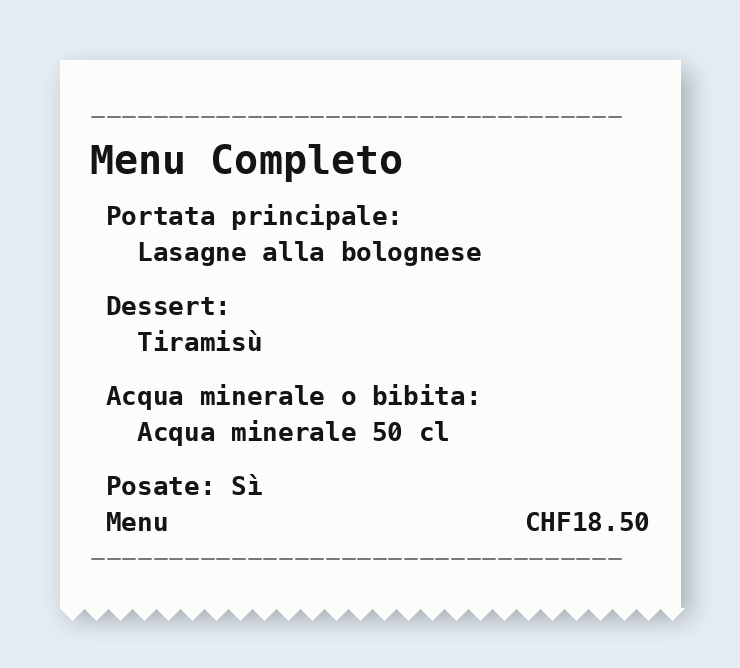
    • Support for IBSA Menu (>= 2.3.0): the receipt prints a block for each menu with title, a line for each dish with the plate to be delivered, choice of cutlery and menu price. Lines without IBSA data and sites without IBSA Menu print exactly as before.
ticinoWEB Assistant Online